Blog
How to Connect AI to Your Database Safely
Most useful business AI needs your data. An assistant that answers questions about orders, invoices or tickets is guessing unless it can read the records. So sooner or later someone asks how to connect AI to your database, and the honest answer is that the connection is the easy part. The hard part is deciding what the AI can see, what it can never touch, and how you'll prove later what it read. Here's how we answered those questions in Proofly, our AI copilot for chargeback disputes.
Is it safe to connect AI to your database?
It can be, if the safety lives in the database and the code around the model, not in the prompt. A prompt that says "never run DELETE" is a request. A database role that can only read is a guarantee. Start read-only, limit the AI to the tables and columns the task needs, have your own code run the queries, and log every read. With those in place, the worst a confused model can do is read something it was already allowed to read.
The rest of this post is what that looks like in a real build.
What Proofly needs to read
Proofly answers one question: should a merchant contest or accept an "item not received" chargeback? To answer it, the app needs the order, payment, fulfillment, refund and return records for one order ID, plus the merchant's refund and shipping policy. Those rows live in the merchant's own database, and a dispute has a hard reply deadline.
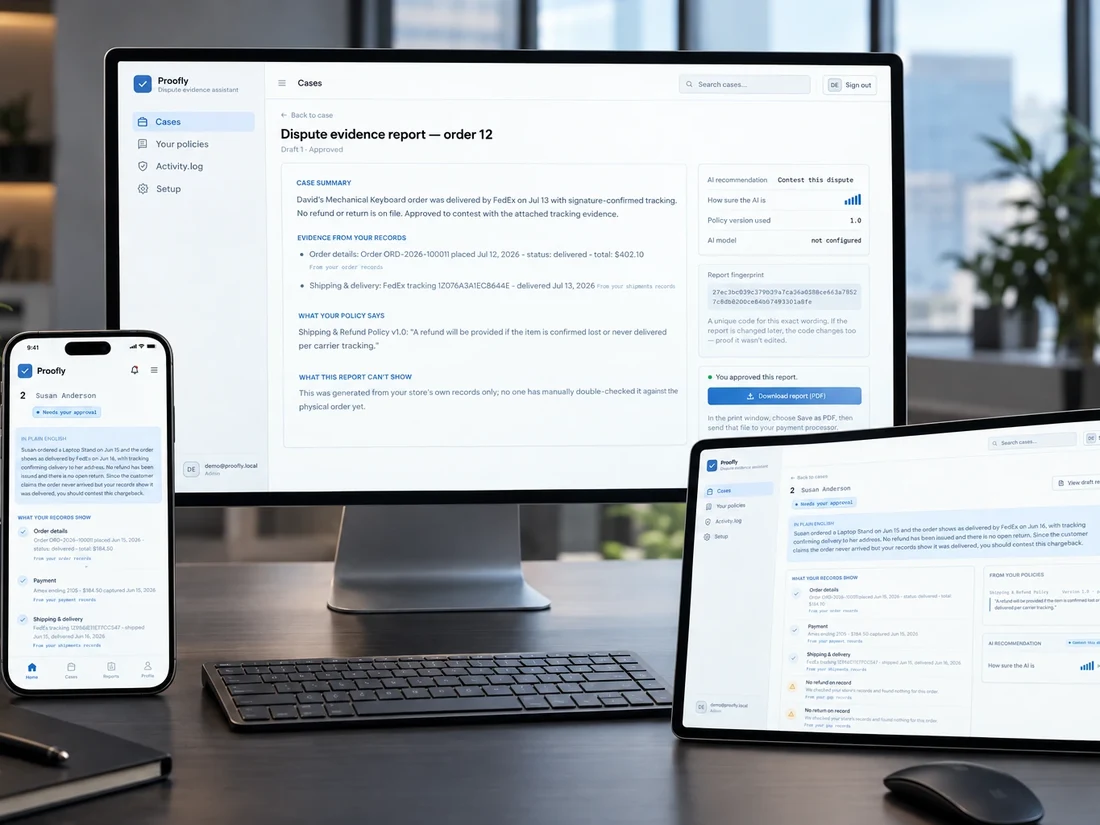
That's a narrow need, and narrow is good. The tighter you can describe what the AI must read, the smaller the door you have to open. "Read everything so the AI can figure it out" is how a reporting assistant ends up quoting salary tables.
A note on what follows: Proofly is a working build that isn't live yet, so we're not claiming usage numbers or results. The code in this post is illustrative TypeScript and SQL that shows the pattern. Proofly itself is a Spring Boot app, and none of this is copied from its source.
How to connect AI to your database: read-only by design
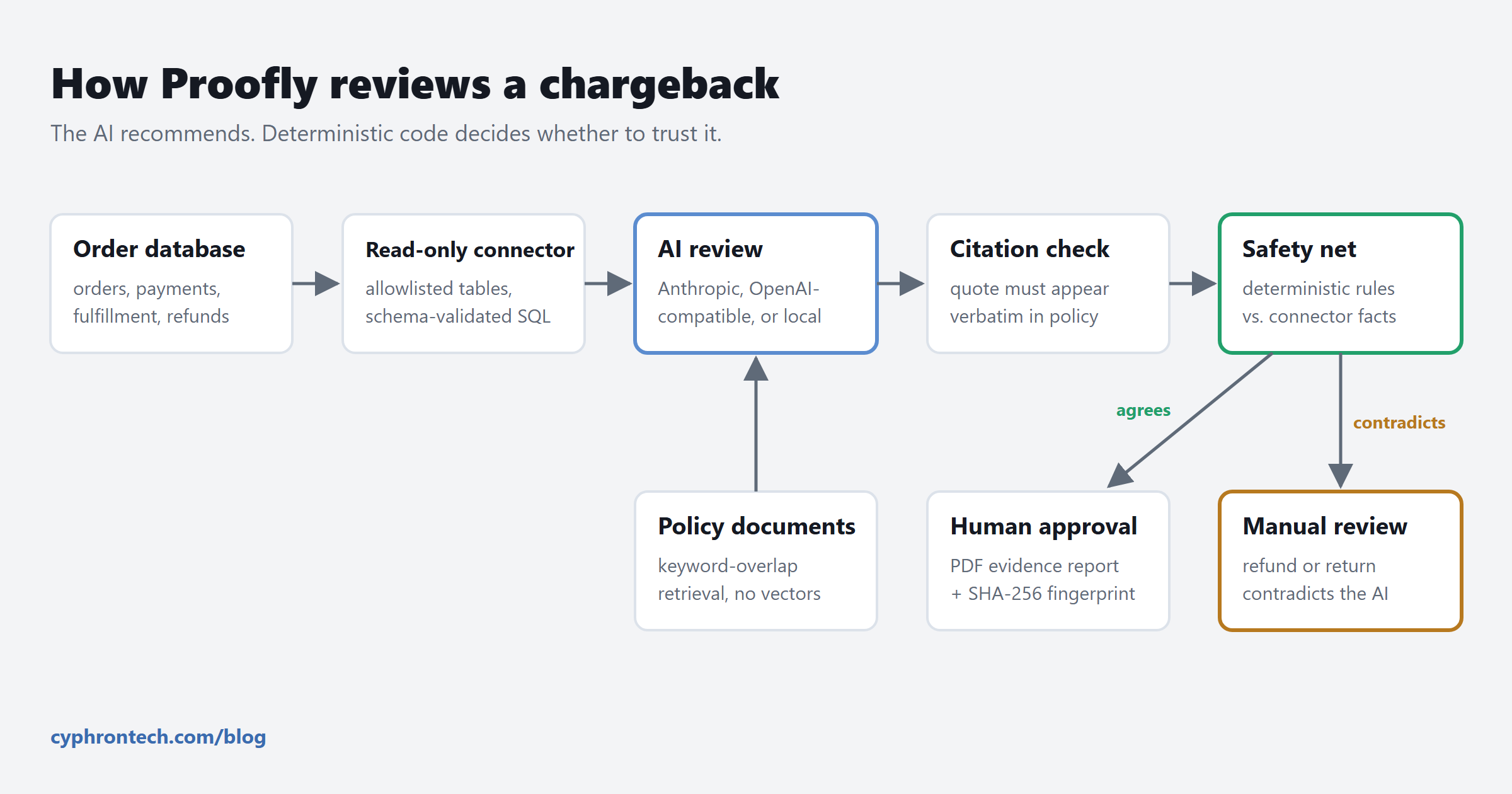
Proofly uses a read-only, allowlisted database connector with schema-validated queries. Each of those words is a separate layer, and each one catches a different mistake:
- Read-only means the AI layer can never write to the merchant's order data. The strongest place to enforce that is the database itself, with a role that has no write permissions, so a bug anywhere above it still can't change a row.
- Allowlisted means only the tables and columns the task needs are reachable. Everything else doesn't exist as far as the connector is concerned.
- Schema-validated means a query is checked against the mapped schema before it runs, so a misnamed table or column fails loudly instead of returning something unexpected.
On PostgreSQL, the first layer can be a few lines. This is the general shape we'd use on any project:
-- A login that can read a handful of tables and nothing else.
CREATE ROLE ai_reader LOGIN PASSWORD '...';
GRANT CONNECT ON DATABASE shop TO ai_reader;
GRANT USAGE ON SCHEMA public TO ai_reader;
GRANT SELECT ON orders, payments, fulfillments, refunds, returns TO ai_reader;
ALTER ROLE ai_reader SET default_transaction_read_only = on;
ALTER ROLE ai_reader SET statement_timeout = '5s';Even read access can hurt if it's too wide, so the role only gets SELECT on the tables the task uses. If some columns are sensitive, a view with just the needed columns is a cleaner grant than the whole table.
Your code runs the queries, not the model
A popular way to connect AI to a database is to let the model write SQL. That's useful for open-ended analytics, but for a workflow like a chargeback, it's the wrong trade. In Proofly's pipeline the connector runs first: it reads the rows for the order ID, and the model is handed that evidence afterwards. The model never composes a query.
That design makes the allowlist easy to enforce, because the queries come from a fixed set your code owns:
type Mapping = { table: string; key: string; columns: string[] };

// What the setup step mapped: the only tables and columns the AI layer can see.
const ALLOWED: Record<string, Mapping> = {
  orders:  { table: "orders",  key: "id",       columns: ["id", "status", "total", "created_at"] },
  refunds: { table: "refunds", key: "order_id", columns: ["id", "status", "amount", "created_at"] },
};

async function readEvidence(db: Db, source: string, orderId: string) {
  const m = ALLOWED[source];
  if (!m) throw new Error(`Not allowlisted: ${source}`);
  // Identifiers come from the mapping, never from the model; the value is a bound parameter.
  return db.query(
    `SELECT ${m.columns.join(", ")} FROM ${m.table} WHERE ${m.key} = $1`,
    [orderId],
  );
}Notice that the refunds lookup returns every refund row for the order, not just the first. Proofly does the same, because an order can have a failed refund followed by a successful one. Small details like that are where an AI answer goes wrong if the data underneath it is incomplete.
Map the client's schema instead of forcing yours
Every business names things differently. One merchant's refunds table has a status column; another records refunds as negative payments. Proofly handles that with a setup wizard that maps a merchant's own tables and columns, including what an "issued" refund looks like in their schema, instead of forcing a fixed one.
That mapping can do double duty. It tells the connector where the data lives, and it can serve as the allowlist: if a column wasn't mapped, the connector has no way to ask for it. When security and setup are the same step, nobody has to remember to lock things down afterwards.
The facts you read become the check on the AI
Reading the data with your own code has a second benefit: your system now holds facts the model can't argue with. Proofly uses them. After the model recommends contesting or accepting, plain code compares that recommendation with what the connector read. If the model says contest but the records show a refund was already issued, the case goes to manual review, however confident the model sounded.
We wrote about that safety net, and about checking every policy quote word for word, in Why Our Chargeback AI Doesn't Trust Itself. The point here is that it only works because the facts came from the database through your code, not from the model's description of the database.
Decide where the data goes
Read-only protects the database. It doesn't decide where the rows travel once they're read. Every record you put in a prompt goes to whichever model provider you call, so that choice is part of the database security design, not an afterthought.
Proofly is designed as a self-hosted, single Windows installer with an embedded database, running on the merchant's own machine. It works with Anthropic, OpenAI-compatible APIs or a local model, with the provider key encrypted at rest. A merchant who doesn't want order data leaving the building can point it at a local model.
It also caps how much it sends. Policy excerpts are limited to about 24,000 characters per request, so a long PDF doesn't slow every case or overflow the model's context. Sending only the rows and passages a case needs is cheaper, faster and exposes less.
One more thing worth designing for: text stored in your database is input you don't control. A customer note or a support message can contain instructions aimed at the model. A read-only connector limits what that can do, and checks like Proofly's safety net mean a manipulated answer still gets compared with the records before anyone acts on it.
Log every read
Proofly keeps a full audit trail of what was read, what was recommended, what the safety net changed and what a person approved. Approved evidence reports carry a SHA-256 fingerprint of their content, so any edit after approval changes the code.
For any AI that touches business data, that log answers the questions you'll eventually be asked: what did the AI see, what did it say, and who decided? It's also how you'd notice an assistant reading far more than its task needs. We go deeper into review queues and approvals in our post on human-in-the-loop handoffs.
The takeaway
Connecting AI to your database is a permissions problem before it's an AI problem. Before we connect a model to a client's data, we want an answer to each of these:
- Is read-only enforced by the database role, not just by the prompt or the app?
- Which tables and columns does the task actually need, and is everything else unreachable?
- Does your code run the queries, with identifiers from a fixed mapping and values as bound parameters?
- Which facts from the database does code compare against the model's answer?
- Which model provider sees the data, and can sensitive clients use a local model?
- Is every read, recommendation and approval logged?
Read more about the build in our Proofly case study, or see how we design read-only, audited AI workflows for clients on our AI automation page. If you want AI working on your own data without handing it the keys, get in touch.