AI automation

AI automation for the work your team repeats

We map one workflow, automate it with AI steps and human review where it matters, and hand you a system your team can run and change.

One workflow from $1,500* · AI agent from $4,000**Terms and conditions apply

Typical first workflow
4 to 6 weeks
Demos
Weekly
Human review
Built in where risk needs it
After launch
30-day fix window

Is it a fit?

Who this is for

Best for growing businesses that already run on a few tools and lose hours moving information between them.

A good fit if

  • You repeat the same steps every daySupport triage, invoice checks, CRM updates, report drafting or approvals.
  • Your tools have APIs or exportsCRM, helpdesk, accounting, email, sheets or a database we can connect to.
  • Someone can own the processA person who knows the workflow and can review AI output during the pilot.

Probably not a fit if

  • You want fully autonomous AI with no reviewWe keep people in the loop wherever a wrong answer is costly.
  • The process is not defined yetWe can help map it first, but automation comes after.

Scope

What you get

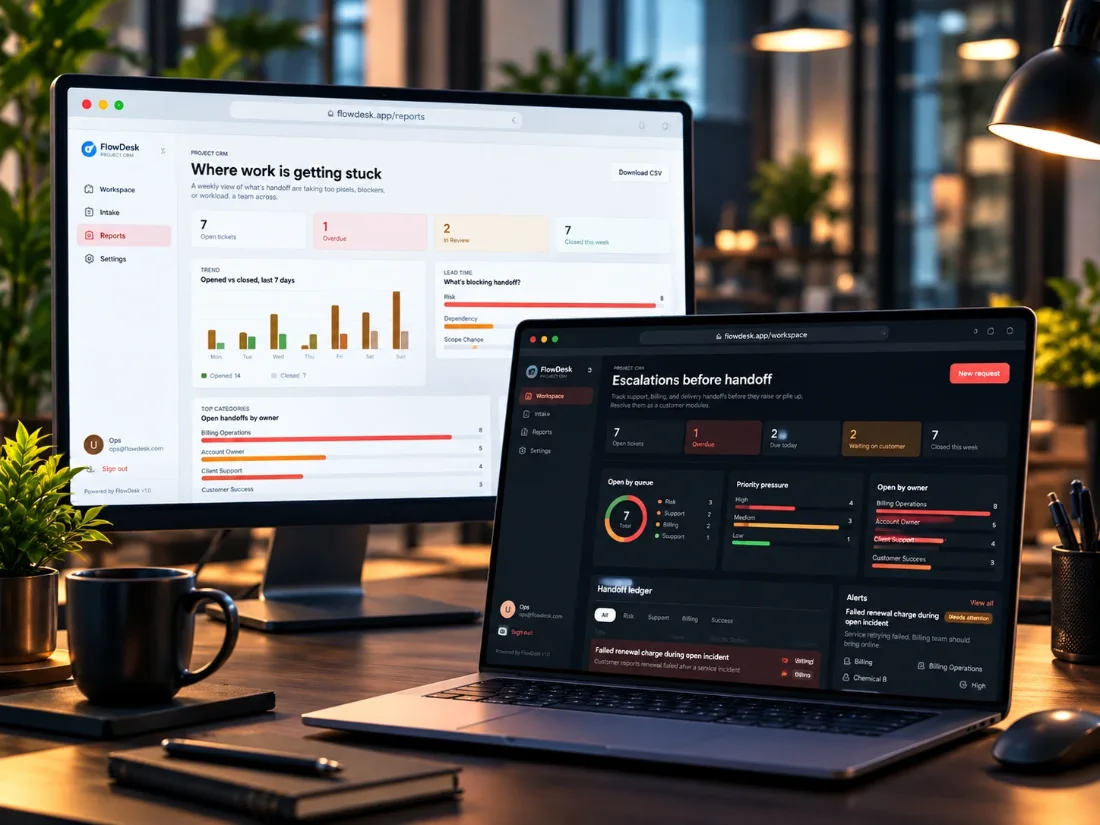
FlowDesk on a monitor and laptop: the Reports view and the escalations workspace
FlowDesk, our own working build: intake, approvals and handoffs in one operations view.
  • Workflow mapCurrent steps, systems, owners and where AI helps or should not be used.
  • The automationBuilt in n8n, Make, Zapier or custom Node.js or Python, whichever fits your team.
  • AI steps with guardrailsPrompts, model choice, checks on output, and clear fallbacks when the AI is unsure.
  • Review and approval pointsPeople approve the steps where business risk requires it.
  • Monitoring and alertsLogs, error alerts and a simple view of what ran and what failed.
  • Documentation and handoverHow it works, how to change it, and a walkthrough with your team.

Not included

  • Third-party subscriptions and AI usageTool plans and model API usage are billed to your accounts, listed upfront in the quote.
  • Large data cleanupFixing years of messy records is scoped separately if it is needed.
  • Ongoing changes after the fix windowAvailable as a support plan, agreed in writing.

Integrations

Tools we commonly connect

Examples, not a limit. If it has an API, a webhook or an export, we can usually work with it.

  • HubSpot
  • Zoho CRM
  • Zoho Books
  • Tally
  • Slack
  • Gmail and Outlook
  • Google Sheets
  • WhatsApp Business
  • Freshdesk
  • Zendesk
  • PostgreSQL
  • OpenAI
  • LangChain

Examples

Example workflows

The kind of workflow we build. Examples of scope, not client results.

Gmail, AI, accounting, Slack

Invoice checks

Supplier invoices from email are read and matched to the purchase order. Mismatches go to a person in Slack before anything is posted.

Forms, AI, HubSpot

Lead follow-up

New enquiries are summarised, tagged and assigned in HubSpot, with a drafted first reply for the sales rep to edit and send.

Zendesk or Freshdesk, AI

Support triage

New tickets are summarised, tagged and routed to the right queue. The agent gets a suggested reply; unusual cases go straight to a person.

Timeline

How a first workflow runs

Week 1

Map

Workflow walkthrough, systems access, success measures and a fixed written scope.

Weeks 2 to 4

Build

The automation and AI steps, with a demo every week so you see progress and steer.

Weeks 5 to 6

Scale

Pilot on real work, monitoring, fixes, documentation and handover.

Simple workflows can be faster. Several connected workflows are planned in phases.

Cost

What affects the price

Every project gets a written quote before work starts, covering scope, fees, GST, payment schedule and third-party costs. These are the things that move it most.

  • Number of workflows and stepsOne focused workflow costs far less than a chain of five.
  • Systems to connectClean modern APIs are quick; old systems or manual exports take longer.
  • Data qualityMessy or inconsistent records need cleanup or extra checks.
  • How much review is neededApproval steps, audit trails and exception handling add work.
  • Privacy and compliancePersonal data, hosting region or industry rules add design and testing.
  • Support after launchOptional, agreed separately from the build.

Questions

AI automation FAQs

Anything else? Send it with your brief and we will answer it on the mapping call.

Do we have to change the tools we use?

Usually not. We connect the tools you already have and only suggest a change when a tool cannot support the workflow.

Which AI models do you use?

We pick per task, usually OpenAI models, and design the workflow so the model can be swapped later without rebuilding everything.

Is our data used to train AI models?

We use provider API plans where your data is not used for training by default, and we only send the data a step actually needs.

What happens when the AI gets something wrong?

Steps that matter have checks and a human review point. Low-confidence results are flagged for a person instead of passing through.

Can you work with our existing n8n or Zapier setup?

Yes. We review what is there, fix what is fragile, and extend it rather than starting again where that makes sense.

How do we start?

Send a short brief through the contact form. We reply within one business day and set up the mapping call.

Have a workflow in mind?

Tell us what your team repeats every day. We will tell you if AI is worth it.

Start an AI Project