Blog
Designing AI Triage That Teams Can Overrule
Service businesses rarely have a ticket problem. They have a queue problem: requests arrive through CRM records, support tickets, billing tools and chat alerts, and someone has to work out who owns what before any real work starts. FlowDesk is our working build for that job, a web command center with an AI triage layer. Here's how we think about the design of that layer, and why the model's output is treated as a suggestion the team can see, check and overrule.
The problem is the queue, not the ticket
Most service teams can answer any single request well. What goes wrong is everything before the answer. A request sits in the wrong inbox. A billing change waits on an approval nobody knows about. A long support conversation gets handed to a colleague who has to read all of it to find out what's actually being asked. Meanwhile leadership has no clear view of where work is stuck.
FlowDesk pulls intake, approvals, support routing, billing events and status reporting into one place. Requests enter through structured forms and integrations and become trackable work items with an owner and SLA context. The AI layer sits on top of that: it reads the intake context, support notes and client history, then recommends routing, drafts summaries and flags work at risk.
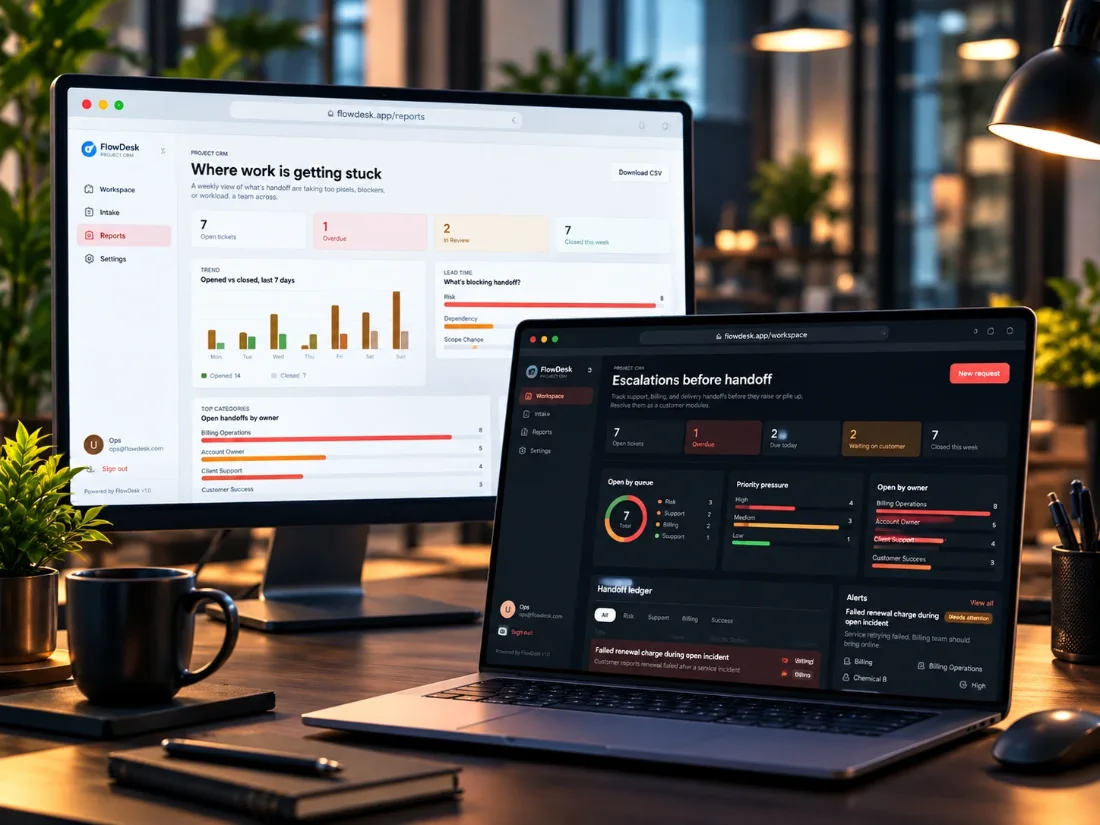
A note on what follows: FlowDesk is a working build that isn't live yet, so we're not claiming usage numbers or results. The code in this post is illustrative TypeScript that shows the pattern. It isn't copied from FlowDesk's source.
Four small jobs, not one smart agent
It's tempting to describe this as one AI agent that runs the queue. We find it much more useful to split it into separate jobs, because each one fails differently and needs different protection:
- Intake triage classifies an incoming request by urgency, department, client and workflow type. A wrong answer sends work to the wrong people, which costs time but can be corrected.
- Summary drafting turns a long conversation into a short handoff note. A wrong answer can quietly drop a detail, so the source conversation has to stay one click away.
- SLA risk alerts flag work likely to miss a response or resolution target. A missed flag is expensive, and too many flags teach people to ignore them.
- Next-step prompts suggest the action most likely to unblock a stalled request. A wrong answer is cheap, because a person reads it and moves on.
Written down like that, the design questions get easier. There's no single setting for how much to trust the AI. There's a separate answer for each job, based on what a mistake costs and how quickly someone would notice it.
Triage output is a claim to check
Classification looks like the safe part of an AI workflow, but a classifier that can return anything will eventually return something your system has no queue for. So the useful habit is to treat the model's answer as a claim, then compare it with what the system already knows: the departments that exist, the workflow types you support and the client on the CRM record.
type Triage = { urgency: string; department: string; workflowType: string; clientId: string };
type Known = { departments: Set<string>; workflowTypes: Set<string>; crmClientId: string | null };

// Anything we can't verify goes to a person, along with the reasons.
function routeTriage(triage: Triage, known: Known) {
  const problems: string[] = [];
  if (!known.departments.has(triage.department)) problems.push("Unknown department");
  if (!known.workflowTypes.has(triage.workflowType)) problems.push("Unknown workflow type");
  if (triage.clientId !== known.crmClientId) problems.push("Client doesn't match the CRM record");

  return problems.length > 0
    ? { queue: "manual-triage", problems }
    : { queue: triage.department, suggestion: triage };
}Two things matter here. The problems travel with the work item, so whoever picks it up can see why it landed with them instead of guessing. And the client check uses the CRM, not the model's reading of an email signature. When your system already holds a fact, ask the system.
It's the same idea we used in Proofly, where plain code compares the model's recommendation with what the merchant's database says. The stakes are lower in routing than in a chargeback dispute, but a check this small costs almost nothing to add.
Keep the SLA clock in plain code
Response and resolution targets are arithmetic. If a request has to be answered by 4pm, you don't need a model to tell you it's 3:50. Where AI can add something is the part a timer can't see: a support note saying the client is about to escalate, or a conversation that has gone quiet after a promise was made.
That suggests a simple structure, with the clock deciding first and the model only able to add a reason to look:
// The clock is arithmetic. The model can raise attention, never lower it.
function slaStatus(item: WorkItem, now: Date, aiFlag: { reason: string } | null) {
  const minutesLeft = (item.respondBy.getTime() - now.getTime()) / 60000;

  if (minutesLeft <= 0) return { level: "overdue", why: "Response target missed" };
  if (minutesLeft <= item.warnAtMinutes) return { level: "at-risk", why: "Response target is close" };
  if (aiFlag) return { level: "watch", why: aiFlag.reason };
  return { level: "ok" };
}The asymmetry is deliberate. If the model is wrong about a risk, someone spends a minute looking at a request that was fine. If the model could mark something as safe, it could hide a request that's about to miss its target, and nobody would see it until the client did.
Approvals stay with people
FlowDesk's approval flow covers scope, billing changes, escalations and handoffs. Those are decisions a manager makes, with an audit trail behind them. The AI can prepare them by summarizing the request and suggesting a next step, but it doesn't make them.
That line follows from what a mistake costs. A mis-routed ticket can be moved in seconds. A billing change or a scope commitment made to a client is much harder to take back. We wrote more about drawing this line in our post on human-in-the-loop handoffs, including why rules like this belong in code rather than in the prompt.
The work item therefore needs two separate states: what the AI suggested and what a person decided. Keeping them apart is a small data modeling choice that makes the next two sections possible.
A decision trail you can read
FlowDesk's AI gives operators a first pass and keeps the decision trail visible. In practice, each suggestion is worth recording alongside what happened next:
- What the AI suggested, and the context it was given.
- Whether a check flagged a problem, and which one.
- Who accepted, changed or rejected the suggestion, and when.
- Where the work actually ended up.
This pays off in three ways. When a client asks why a request sat with the wrong team, there's an answer. When someone changes a prompt or a model, the saved decisions become a test set to run first. And when people keep correcting the same kind of suggestion, you've found exactly what to fix next.
Integrations and dashboards that agree
The AI gets the attention, but a command center lives or dies on its plumbing. FlowDesk's direction covers CRM and billing connections, role-based queues, webhook-driven automation, notification rules, and reporting models that give operators and leaders the same source of truth. A few principles apply to any build like this:
- Treat webhooks as unreliable messengers. Events can arrive twice or out of order, so handlers should ignore repeats and shouldn't assume a sequence.
- Notify on changes that need action. FlowDesk's Slack and email alerts cover blockers, overdue work and handoff changes. An alert channel that fires on everything soon gets muted.
- Report on what people decided, not on what the AI suggested. Leadership dashboards cover throughput, bottlenecks, revenue events and service quality signals. Those numbers should come from final states, or a wrong suggestion ends up in an executive report.
- Scope queues by role, so each person sees the work they can act on while leaders read from the same underlying records.
The stack for this build is Next.js, NestJS, PostgreSQL, OpenAI, Slack and Stripe. None of the patterns above depend on those choices.
The takeaway
AI triage is a good place to start with AI in operations, because most routing mistakes are recoverable. It only stays useful if people can see what it did and overrule it easily. Before building one, we'd want an answer to each of these:
- What does each AI job cost when it's wrong, and how fast would anyone notice?
- Which of the model's answers can be checked against your own records?
- Where does work go when a check fails, and who owns that queue?
- Which parts are arithmetic and shouldn't involve a model at all?
- Which decisions always need a person?
- Are the AI's suggestions and the final decisions stored separately?
Read more about the build in our FlowDesk case study or see how we approach this work for clients on our AI automation page. If your team runs on scattered queues, get in touch.